





See where your
attention actually goes.
pause.do helps you catch tab overload, endless scrolling, and hidden screen time with small, well-timed pauses.
Available on all major browsers
A note from us
Hey Human, You already know the feeling.

You already know the feeling. You open one tab to check something small and twenty minutes later, you’re somewhere you never meant to be.
That isn’t weakness. It’s design. The apps you use every day are engineered for momentum to keep you scrolling, clicking, reacting.
pause.do doesn’t fight that with force. It doesn’t block, shame, or gamify. It creates a small gap a moment between impulse and action. And in that moment, you decide.
Our pauses
Tab Overload
When your browser starts thinking for you.
When your tab count crosses your limit, pause.do slows the moment. Close what's noise.Keep what matters.
Scroll Pause
When the feed keeps going.
After extended scrolling, pause.do steps in with a short check-in. No lockouts. No shame. Just awareness so continuing becomes a choice.
Session Pause
When "one minute" turns into twenty.
Tracks how long you've been inside an app and surfaces a pause when time stretches beyond intention.
Think First
Before you prompt. Before you scroll.
Appears before high-drift sites and before you ask AI to think for you. A simple interruption: Why are you here? What are you actually trying to do?
Focus Limit
When you choose to protect your attention.
Set a focus window. During it, high-drift apps trigger firmer pauses designed to support deep work, not restrict you.
In your browser
See your day differently.
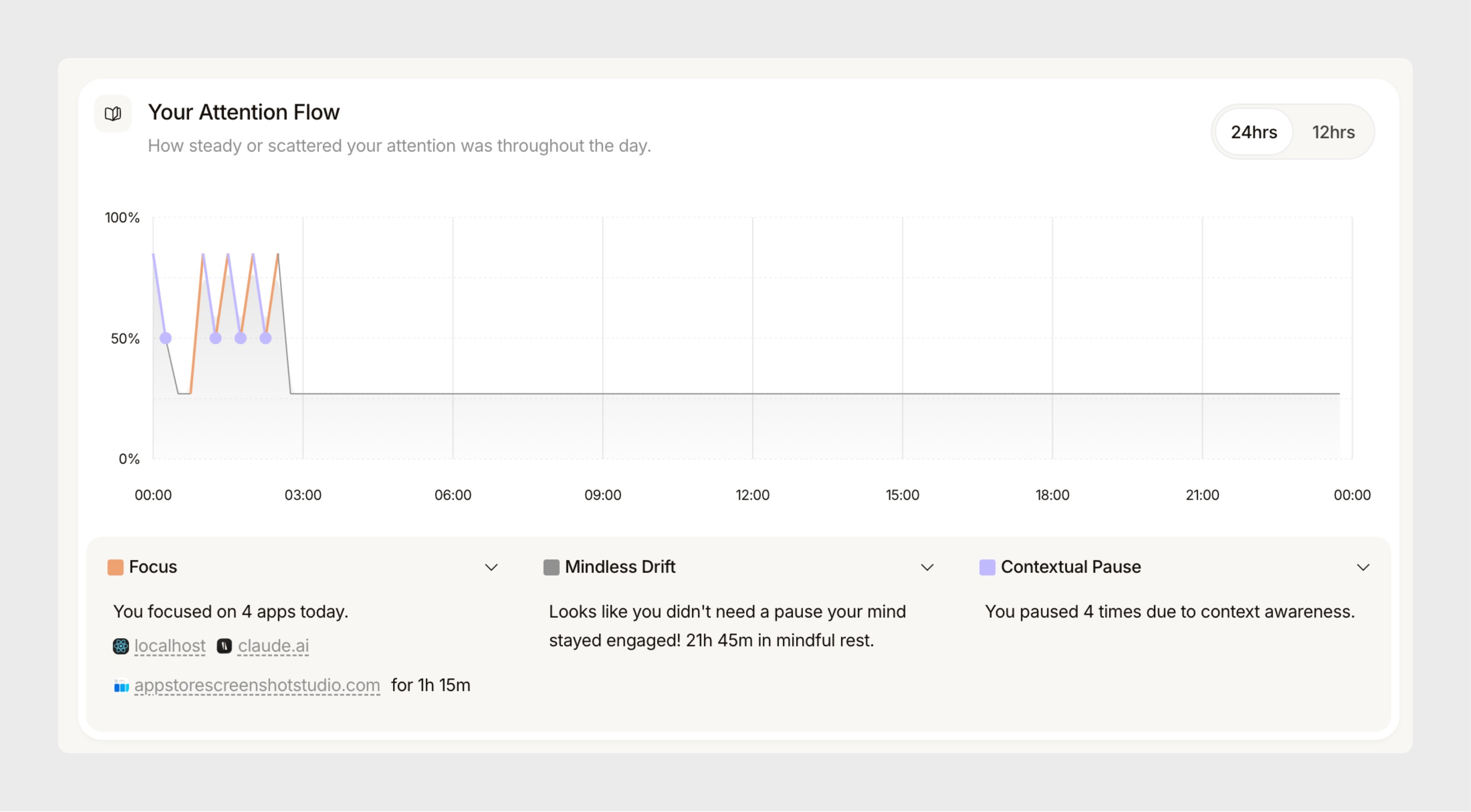
pause.do turns everyday browsing into something visible. See how your focus shifts, where drift begins, and how your patterns evolve.
Real people. Real patterns.
What happens
when you start noticing.
pause.do doesn’t change how you work overnight. It changes what you see and that changes everything.






















Own your attention.
A single license.
its yours forever.
pause.do is a one-time license. No subscriptions. No upsells. Just a tool that helps you think first.
Questions
Your common questions about pause.do
Quick answers to what people ask most.
pause.do is a browser extension that creates small moments between impulse and action. It doesn’t block or shame it surfaces gentle pauses (before AI prompts, during long scrolls, when tabs pile up) so you can choose where your attention goes.
pause.do works on all major Chromium-based browsers (Chrome, Edge, Arc, Brave) and Firefox. Install from the Chrome Web Store or add-on store for your browser.
The extension is free to install and use. A one-time license unlocks all five pause types, Think First for AI, the full Attention Map and insights, and future updates no subscription.
Your attention data stays on your device. We don’t sell or share it. The extension runs locally; only aggregated, anonymized insights may be used to improve the product. See our privacy policy for details.
Yes. You can disable specific pause types, adjust sensitivity, or uninstall anytime. There’s no lock-in your attention, your choice.
pause.do runs entirely in your browser using local pattern matching. It detects low-effort AI prompts (e.g. 'rewrite this', 'make it better'), rapid scrolling sessions, and tab overload. When triggered, a brief 5–30 second overlay appears. You choose whether to pause, try it yourself, or continue. No data leaves your device.
Yes. Freedom and Cold Turkey block websites on a schedule. pause.do does not block or restrict any websites. It inserts micro-pauses at the moment of impulse, targeting specific behaviors AI offloading, rapid scrolling, tab spirals. The choice is always yours.
Read the full comparison →Think First is pause.do’s AI-awareness feature. It detects when you type a low-effort prompt into ChatGPT, Claude, Gemini, or Perplexity phrases like 'rewrite this' or 'make it better' and suggests spending a few minutes attempting the task yourself first. This helps maintain cognitive engagement and prevents habitual AI offloading.
Yes. The Think First feature works on ChatGPT, Claude, Gemini, Perplexity, and any AI tool you access in the browser. It detects low-effort prompt patterns regardless of which AI platform you're using.
The Attention Map is a local-only dashboard showing how your focus moved throughout the day where drift began, which sites consumed the most time, and your human vs. AI decision balance. All data is stored in IndexedDB on your device. Nothing is sent to any server.